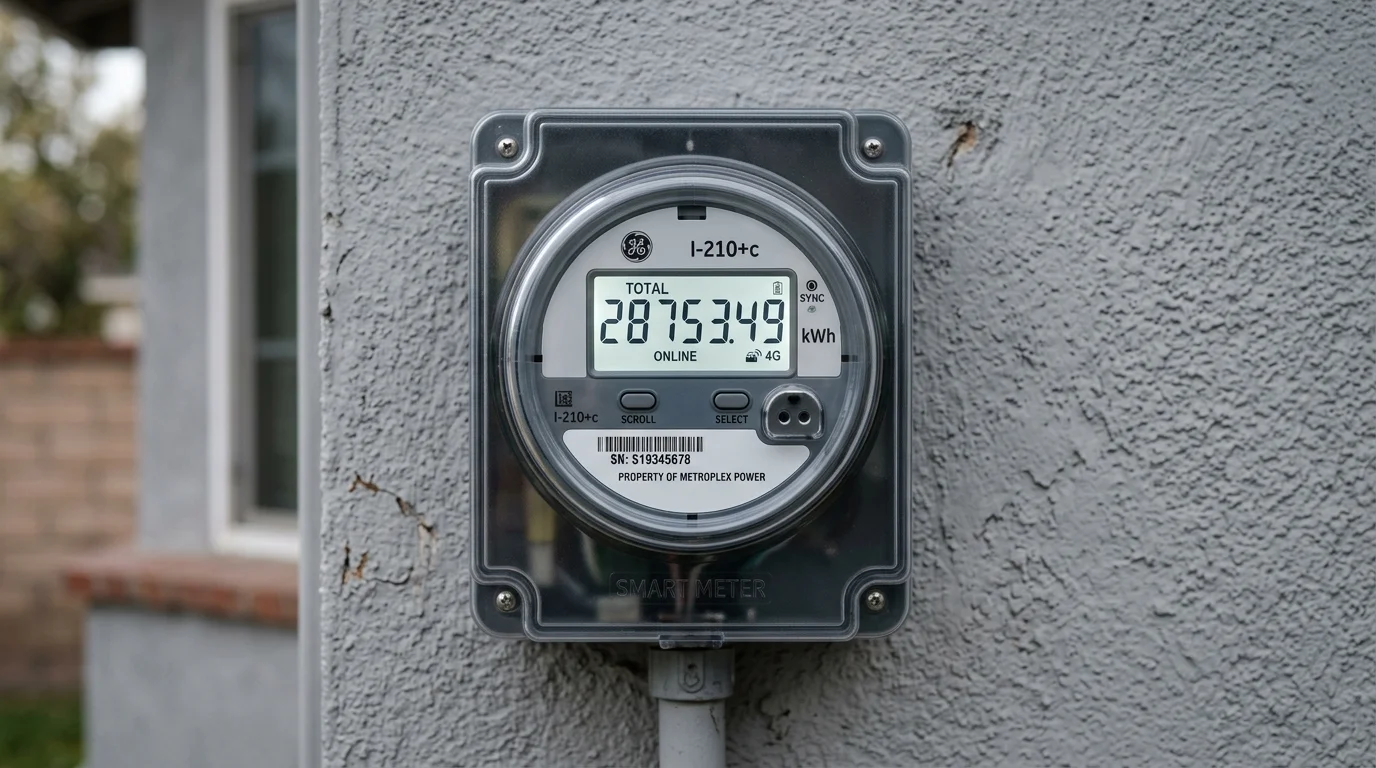
Your electricity meter is the official cash register of your power utility company. Yet, for most homeowners, the utility meter mounted outside remains an intimidating device cycling through numbers, engineering acronyms, and flashing red LEDs.
Understanding how to read your electric meter empowers you to verify your monthly billing accuracy, track daily energy usage, monitor solar net-metering exports, and detect hidden wiring leakage or phantom power draws before an inflated electricity bill arrives.
Because meter technologies vary widely across neighborhoods and eras, reading instructions depend directly on whether your home has a standard digital electronic meter, a modern smart meter (AMI), or an older electromechanical analog dial meter.
1. How to Read Your Specific Meter Type
Electricity meters fall into three primary technological generations:
[ Meter Generation ]
        │
        ├─► 1. Electromechanical Analog Meter ──► 4 to 5 mechanical rotating clock dials
        │
        ├─► 2. Electronic Digital Static Meter ──► Push-button / auto-cycling LCD screen
        │
        └─► 3. Smart Meter (AMI / Prepaid)      ──► Two-way cellular/RF comms, remote disconnect
Type 1: Digital Electronic Static Meters (LCD Display)
The most widespread meter in residential housing today is the solid-state digital static meter (manufactured by companies such as Secure Meters, Schneider Electric, L&T, Genus, Landis+Gyr, or HPL).
- Display Mechanism: A high-contrast liquid crystal display (LCD) showing 5 to 7 digits.
- Auto-Scroll vs. Push-Button Mode:
- Auto-Scroll: By default, the display automatically cycles through 6 to 12 different parameters every 5 to 10 seconds.
- Push-Button (Manual Scroll): Modern meters feature a physical push-button on the front casing. Pressing this button steps through each parameter immediately, allowing you to find the billing reading without waiting for the auto-cycle.
- Understanding Decimal Displays: Many digital meters display decimal values (tenths or hundredths of a unit) separated by a decimal point or highlighted in a contrasting colored border. Check your physical electricity bill to verify whether your utility records readings in whole integer kWh or includes fractional decimals. When tracking your consumption, always subtract previous and current readings using the exact same format and decimal convention.
Type 2: Smart Meters (AMI / Pre-Paid / Bi-Directional)
Smart meters represent the modern standard being deployed under national grid modernization initiatives (such as India's Smart Meter National Programme and global Advanced Metering Infrastructure / AMI rollouts).
- Automated Communication: Smart meters can send metering data to the utility through communication technologies supported by the local AMI infrastructure. Depending on the deployment, this may include cellular networks, RF mesh, or other supported communication methods. Communication capabilities differ between models and utility systems.
- Unique Screen Indicators to Look For:
- Antenna / Signal Icon: Indicates active cellular or RF mesh connection to the utility server.
- Switch / Relay Status Icon: Shows whether the internal disconnect contactor is closed (power connected) or open (power disconnected due to non-payment or safety trip).
- Prepaid Balance / Credit Display: On prepaid smart meters, pressing the button cycles to a screen displaying remaining prepaid monetary balance or remaining kilowatt-hour units.
- Time-of-Day (ToD / ToU) Registers: Smart meters record consumption into separate tariff registers (e.g., Peak, Normal, and Off-Peak/Solar hours).
- (Note: Screen symbols such as antennas, switches, or battery icons are common across modern AMI meters, but their exact visual iconography, blink cadence, and display order vary depending on manufacturer specifications and utility firmware).
Type 3: Older Electromechanical Analog Dial Meters
Although being phased out globally, millions of older homes and rural properties still have traditional electromechanical meters featuring a spinning horizontal aluminum Ferraris disc and a row of circular clock-like dials.
Understanding 4-Dial vs. 5-Dial Meters:
Residential analog meters generally feature either 4 or 5 dials:
- 4-Dial Meters: Found on older residential installations, registering up to $9,999\text{ kWh}$ and rolling over to
0000at $10,000\text{ kWh}$ (some utilities apply a dedicated Multiplier Factor or document rollovers on monthly invoices). - 5-Dial Meters: The widespread modern analog standard, registering up to $99,999\text{ kWh}$ before rolling over at $100,000\text{ kWh}$. Each dial represents a decimal order of magnitude ($10,000\text{s}$, $1,000\text{s}$, $100\text{s}$, $10\text{s}$, and $1\text{s}$) linked by internal 10:1 gear trains.
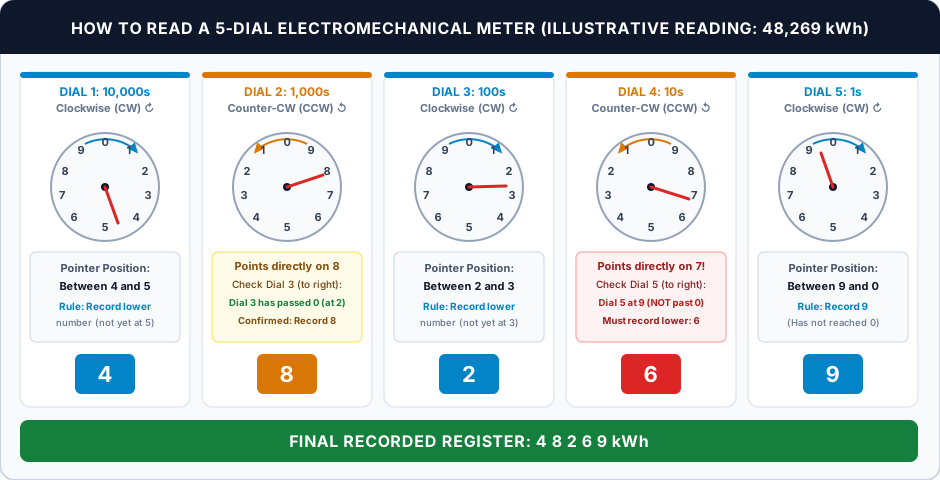
(Note: The diagram above demonstrates an illustrative 5-dial meter reading 48,269 kWh. Because meter designs vary, always inspect the directional arrows and numbering order on your specific meter).
Step-by-Step Rules for Reading Analog Dials:
- Read Left to Right: Read the dials sequentially from left to right (from the highest place value down to the $1\text{s}$ dial), exactly as you would read a standard multidigit number.
- Account for Alternating Rotation Directions: On many traditional dial meters, adjacent dials rotate in alternating directions; check the directional arrows or numerical order marked on your meter:
- Dial 1 ($10,000\text{s}$): Often rotates Clockwise (CW) ↻
- Dial 2 ($1,000\text{s}$): Often rotates Counter-Clockwise (CCW) ↺
- Dial 3 ($100\text{s}$): Often rotates Clockwise (CW) ↻
- Dial 4 ($10\text{s}$): Often rotates Counter-Clockwise (CCW) ↺
- Dial 5 ($1\text{s}$): Often rotates Clockwise (CW) ↻
(Always verify whether digits $0 \to 1 \to 2$ proceed clockwise or counter-clockwise on each dial face).
- The "Between Numbers" Rule: If the pointer rests between two numbers, always record the lower number. For instance, on a clockwise dial, if the pointer rests between 4 and 5, write down
4. - The Critical "Between 9 and 0" Rule: In a circular dial,
0represents the completion of a full ten-unit cycle ($10$). A pointer located between9and0has not yet completed its rotation to reach0; therefore, record9. - Pointer Pointing Directly at a Number (The Right-Hand Dial Rule):
Because each dial is physically driven by the dial immediately to its right, a dial hand only completes its transition to a whole number when the dial to its right completes a full $360^\circ$ revolution and passes0.
If a dial pointer appears to point directly on a number (e.g., directly on7or8):- Examine the dial immediately to its right (Dial $N+1$), noting its specific direction of rotation.
- If the right-hand dial has passed
0in its rotation direction (e.g., pointing to1or2), then the current dial has genuinely reached that number. Record the number it is pointing at. - If the right-hand dial has NOT yet reached
0in its rotation direction (e.g., pointing to8or9), then the current dial has not finished its advance. Record the preceding (lower) number!
(In the illustrative diagram above, Dial 4 appears directly on7. Looking to Dial 5 on its right, Dial 5 is resting at9and has not crossed0. Therefore, Dial 4 must be recorded as6, giving a correct total reading of48,269 kWh).
- Ignore Decimal Dials: If your meter features a rightmost fractional dial (often marked in red or labeled "1/10"), disregard it unless your utility explicitly requests tenths on your bill.
2. Decoding the LCD Screen: Cumulative kWh vs. Other Parameters
The single biggest source of confusion with digital and smart meters is the auto-cycling display. Because the screen displays dates, voltages, peak power demands, and power factors alongside energy consumption, homeowners often mistake a voltage reading (238 V) or Maximum Demand (4.2 kW) for their cumulative electricity units.
The table below breaks down the standard display parameters found on residential digital meters:
| Display Label / Indicator | Unit of Measure | Engineering Definition | Role in Your Monthly Electricity Bill |
|---|---|---|---|
| Cumulative Active Energy (kWh) | kWh (or KWH / cum kWh) | Total active (real) electrical energy consumed since installation. | The primary number used to calculate your bill. Your monthly units are calculated by subtracting the previous month's kWh reading from this number. |
| Maximum Demand (MD) | kW or kVA (labeled MD) | The highest average power demand recorded over a specified integration interval during the billing cycle (depending on meter configuration and applicable tariff). | Monitors whether you exceed your contract/sanctioned load. Exceeding your sanctioned load can trigger penal fixed charges or contract load enhancements under DISCOM rules. |
| Cumulative Apparent Energy (kVAh) | kVAh | Cumulative apparent energy (the time-integral of apparent power). | Billing applicability depends on your specific utility tariff schedule and meter configuration (frequently applied in commercial tariffs and select residential categories to incentivize high power factor). |
| Power Factor (PF) | Ratio (0.00 to 1.00) | The ratio of real power to apparent power ($\text{PF} = \text{kW} / \text{kVA}$). Its value varies with the appliances operating in the home. | Some tariffs impose power-factor-related charges for eligible consumer categories, so check your applicable tariff rather than assuming a universal residential threshold. |
| Instantaneous Voltage | V (Volts) | The real-time supply voltage measured by the meter. | Compare the reading with the nominal voltage and permitted variation specified by your local electricity supply standards or DISCOM. A single display reading does not, by itself, establish whether the supply is compliant. |
| Instantaneous Current | A (Amperes) | The exact electrical current currently flowing through the meter into your home. | Diagnostic only. In AC circuits, $V \times I$ represents apparent power in Volt-Amperes (VA); real working power in Watts requires the power factor: $P \approx V \times I \times \text{PF}$ (using RMS line values). |
| Date & Time | DD-MM-YY / HH:MM:SS | Internal real-time clock timestamp. | Ensures accurate Time-of-Day (ToD) tariff recording and internal event logging. |
| Tamper & Diagnostic Flags | Icons/Codes: MAG, REV, ND, EARTH | Security indicators commonly associated with magnetic interference (MAG), reverse current flow (REV), neutral disturbance (ND), or earth/ground load imbalance (EARTH). | Alerts utility technicians to potential wiring abnormalities or tamper events. Important: Exact display codes and sensor trigger thresholds vary by manufacturer and meter firmware. An illuminated EARTH symbol should not be taken as definitive proof of a neutral-to-ground wiring fault or leakage; consult the meter manual or contact your DISCOM or a qualified licensed electrician for an on-site insulation and continuity test. |
How to Spot the Billing Number Instantly: Look exclusively for the display screen where the unit suffix reads
kWh(orKWH). If the screen showskWwithout theh, you are looking at instantaneous power or Maximum Demand, not cumulative energy consumption!
3. Solar Net-Metering Displays: Import, Export, and Net Energy
When a household installs a rooftop solar photovoltaic system, the utility company replaces the standard unidirectional meter with a Bidirectional Net-Meter (or reconfigures a smart meter for four-quadrant operation).
A net-meter tracks electricity flowing in two opposite directions:
                  ┌──────────────────────────────────────────────┐
                  │          ROOFTOP SOLAR NET-METER             │
                  └──────────────────────────────────────────────┘
                                  ▲              ▲
                                  │              │
                   Grid to Home   │              │   Solar to Grid
                   (IMPORT kWh)   │              │   (EXPORT kWh)
                                  ▼              ▼
           [ Utility Power Grid ] ◄──────────────► [ Home Electrical Panel & Solar ]
The Three Core Net-Metering Registers:
- Import Active Energy ($kWh_{imp}$ / frequently OBIS Code
1.8.0):- Represents all electricity drawn from the utility grid into your home (e.g., during the night, early mornings, rainy days, or when power consumption exceeds solar production).
- Export Active Energy ($kWh_{exp}$ / frequently OBIS Code
2.8.0):- Represents all surplus solar electricity pushed back into the utility grid (e.g., during sunny afternoons when solar panels generate more power than appliances consume).
- Net Energy Balance ($kWh_{net} = kWh_{imp} - kWh_{exp}$):
- The calculated mathematical difference between imported and exported active energy during the billing cycle.
- Important Qualification: Net billed energy ($kWh_{net} = kWh_{imp} - kWh_{exp}$) serves as an illustrative physical energy balance. It does not represent your final payable electricity bill amount; fixed/contract demand charges, minimum monthly billing thresholds, electricity duty, regulatory surcharges, fuel adjustment charges (FAC/FPPPA), and specific surplus banking/settlement terms are calculated separately on your utility bill.
(Note: While OBIS codes like 1.8.0 and 2.8.0 are common international standards, exact on-screen abbreviations, register labels, and cycle sequences vary across meter manufacturers and utility specifications).
Understanding Display Directional Arrows
Bidirectional meters display small directional arrows on the LCD screen:
- Right Arrow (
→): Power is currently flowing from the grid into your home (Importing). - Left Arrow (
←): Power is currently flowing from your solar system into the grid (Exporting). - Both Arrows Active / Flashing: Indicates active bidirectional communication or reactive power exchange.
(Directional arrow indicators are common on bidirectional meters, though exact display logic and arrow orientation vary by meter model).
How Utility Companies Settle Solar Net-Metering Accounts:
- Scenario A (Net Consumer): If imported energy is 450 kWh and exported energy is 300 kWh, the illustrative net energy balance is 150 kWh (450 − 300). The final bill may differ because of the applicable net-metering settlement method, tariff structure, fixed charges, taxes, and other DISCOM billing rules.
- Scenario B (Net Producer / Surplus): If exported energy exceeds imported energy during the billing period, the difference represents an energy surplus for that period. Whether this surplus is carried forward, credited financially, or settled at a specified interval depends on the applicable state regulations, consumer category, net-metering agreement, and DISCOM billing rules. Check the latest applicable rules before estimating the financial value of surplus electricity.
4. Step-by-Step Practical Examples: Calculating Consumption from Meter Readings
To verify your utility bill or track daily household consumption, follow these mathematical examples:
Example 1: Standard Monthly Residential Consumption
Suppose you want to verify your utility bill over a 30-day billing cycle on a direct-reading digital meter:
- Record the Previous Reading:
On Day 1 (or the previous meter reading date noted on your bill), you view the cumulativekWhscreen:
$$\text{Previous Reading} = 14,350.4\text{ kWh}$$
(If your DISCOM bills on integer kWh, record14350; if billing includes decimals, maintain.4consistently). - Record the Current Reading:
On Day 30 (or the scheduled meter reading date), you view the cumulativekWhscreen:
$$\text{Current Reading} = 14,785.2\text{ kWh}$$
(Record14785or14785.2using the identical convention as the previous reading). - Calculate Total Billed Units (kWh):
$$\text{Billed Units} = \text{Current Reading} - \text{Previous Reading}$$
$$\text{Billed Units} = 14,785 - 14,350 = 435\text{ kWh (units)}$$
(Or $14,785.2 - 14,350.4 = 434.8\text{ kWh}$ if decimals are billed). - Calculate Daily Average Consumption:
$$\text{Daily Average} = \frac{435\text{ kWh}}{30\text{ days}} = 14.5\text{ kWh / day}$$
Discrepancy Check: Compare your calculated units with the "Total Units Billed" on your physical invoice. If the bill lists significantly higher consumption, check whether your utility issued an "Estimated / Average Bill" because their meter reader could not access your property or an automated communication window was missed.
Example 2: Rooftop Solar Net-Metering Calculation
Suppose a home with a 3 kW rooftop solar array tracks its monthly bidirectional meter readings:
| Meter Parameter | Previous Month Reading | Current Month Reading | Net Units for the Period |
|---|---|---|---|
| Import Active Energy ($kWh_{imp}$) | 8,200 kWh | 8,650 kWh | $8,650 - 8,200 = \mathbf{450\text{ kWh}}$ (Drawn from grid) |
| Export Active Energy ($kWh_{exp}$) | 5,100 kWh | 5,850 kWh | $5,850 - 5,100 = \mathbf{750\text{ kWh}}$ (Sent to grid) |
Calculating Net Energy Balance: $$\text{Net Energy Balance} = \text{Imported Units} - \text{Exported Units}$$ $$\text{Net Energy Balance} = 450\text{ kWh} - 750\text{ kWh} = \mathbf{-300\text{ kWh}}$$
Illustrative Billing Result: Exported energy exceeded imported energy by 300 kWh during this example period, resulting in a negative net energy balance ($-300\text{ kWh}$). A negative energy balance is not inherently your final bill amount or cash credit; the actual billable balance, financial credit, and treatment of surplus energy depend on applicable state regulations, DISCOM billing rules, and settlement terms. Do not assume that the full surplus will automatically roll over to the next month.
Example 3: The Meter Multiplier Factor (MF / CT Ratio)
For a direct-connected whole-current meter, the billing multiplier is commonly 1, but this should not be assumed for every installation. Check the multiplier factor (MF) printed on your electricity bill and confirm it with your DISCOM if the meter uses external current transformers or the billing details are unclear.
For larger installations where electrical load exceeds the direct-current measurement rating of standard whole-current meters (depending on utility specifications and local supply codes), external Current Transformers (CTs) are used to step down the current:
- If your meter uses Current Transformers with a 100/5 ratio, the meter records only $1/20\text{th}$ of the actual current passing through the service cable.
- For a simple 100/5 current-transformer ratio, the CT ratio is $100 \div 5 = 20$. The final billing multiplier may also depend on the meter's voltage connections, additional instrument-transformer ratios, and the utility's metering configuration. Always use the MF specified on the electricity bill or confirmed by the DISCOM.
- Calculation with MF:
$$\text{Actual Consumption} = (\text{Current Reading} - \text{Previous Reading}) \times \text{MF}$$
$$\text{Actual Consumption} = (15,200 - 15,100) \times 20 = 100 \times 20 = \mathbf{2,000\text{ units}}$$
Always verify the "MF" column printed on your physical electricity bill and cross-check it against DISCOM records.
5. Understanding the Pulse Indicator (LED) & Preliminary Load Checks
Many electronic electricity meters have a pulse indicator labelled imp/kWh or a similar marking. Where provided, a rating such as 3200 imp/kWh means the meter produces approximately 3,200 pulses for each kWh registered under the specified metering conditions. The indicator's appearance and behaviour vary by model, so check the meter nameplate or manufacturer manual. Typical pulse ratings printed on meter nameplates include:
3200 imp/kWh(common on single-phase domestic meters)1600 imp/kWh1000 imp/kWh
What Does the Pulse Rate Mean?
- Visual Activity Cue: Where present, the pulse rate offers an approximate visual indicator of real-time electrical activity. Fast pulsing signifies higher instantaneous power draw, whereas slow pulsing reflects a light baseline load. The pulse indicator is a qualitative activity check, not a precise power measurement. To estimate power from pulse timing, use the meter's stated pulse constant and a timed pulse count; for an accurate household energy reading, use the registered kWh values.
- Model-Specific Differences: The exact behavior of the indicator under idle or zero-load conditions (whether it stays continuously illuminated, dark, or pulses with an anti-creep threshold) varies by meter manufacturer and model; always consult the specific meter nameplate and manufacturer manual.
Preliminary Consumer Load Isolation Check
You can use the meter's pulse indicator as a preliminary check to understand standby power and verify household sub-circuits:
- Step 1: Check for Standby Vampire Draw
Turn off operating appliances (TVs, computers, ACs, lights), but leave them plugged into wall sockets with switches on. If the LED pulses periodically, your electronics are drawing standby power. - Step 2: Check for Unidentified or Hardwired Loads
Turn off switches at wall sockets. If pulse activity continues, check for hardwired or easily overlooked appliances (e.g., a water pump, Wi-Fi router, CCTV DVR, stairwell lighting, or an active inverter battery charger). - Step 3: Main Breaker Isolation Check
Switch off the Main MCB (circuit breaker) inside your indoor distribution panel to isolate household circuits.- If significant consumption or rapid pulsing persists on the meter while your main indoor breaker is fully open, this does not automatically prove a defective meter or an unauthorized tap. There may be connected loads wired between the meter and the breaker, external sub-panels, or specific meter testing characteristics.
- Safety & Regulatory Warning: Never attempt to open the meter enclosure, touch service terminals, or tamper with utility seals. Doing so is hazardous, illegal, and carries severe statutory penalties. If unexpected consumption persists, contact a licensed electrician to verify your internal distribution wiring, or submit a formal meter testing request to your electricity distribution company (DISCOM).
6. What is Maximum Demand (MD) and Why Does It Matter?
When your utility company sanctions an electricity connection, it assigns a specific Sanctioned / Contract Load (typically 2 kW to 5 kW for residential apartments and 5 kW to 10 kW+ for larger houses).
Maximum Demand (MD) records the highest demand measured over a specified interval. The interval length, measurement method, and billing consequences depend on the meter configuration and the applicable tariff or DISCOM rules (commonly measured over 15-minute or 30-minute integration windows).
How Maximum Demand Affects Your Bill:
- If your sanctioned load is 3 kW, but during peak periods your household simultaneously runs multiple heavy appliances (e.g., split air conditioners, water heaters, and microwave ovens), your sustained average demand over the specified interval may exceed 3 kW.
- Depending on your state electricity regulatory commission (SERC) tariff schedule and local DISCOM supply code, exceeding your sanctioned load can result in penal demand charges, higher fixed charge brackets, or a formal notice for contract load regularization. Review the Maximum Demand (MD) entry on your monthly bill to ensure your registered load matches your household's actual peak usage pattern.
7. Regulatory Standards & Technical References
For technical specifications regarding electricity meter calibration, accuracy classes, solar net-metering billing, and consumer rights, refer to the following official authorities:
- Central Electricity Authority (CEA), India: CEA — Metering Regulations — Official statutory regulations and notified amendments specifying meter accuracy standards, testing protocols, and consumer rights across Indian utility networks.
- State Electricity Regulatory Commissions (e.g., GERC, Gujarat): GERC — Renewable Energy Regulations — Official state regulatory orders and amendments governing rooftop solar net-metering agreements, banking provisions, surcharge applicability, and periodic settlement cycles. Note that while this provides a representative regulatory framework, net-metering regulations and tariff orders vary across individual Indian states.
- Bureau of Indian Standards (BIS): BIS — IS 13779:2020 Standard Details — National specification standard for AC static watt-hour meters (Classes 1 and 2), covering metrological accuracy, testing requirements, and electronic security.
- International Electrotechnical Commission (IEC): IEC 62053-21 Standard Details — International benchmark specifying particular requirements and accuracy classes (Classes 0.5, 1, and 2) for AC active energy static meters.